How to Recall a Referral 

  1. Click the Approval History quick link. 
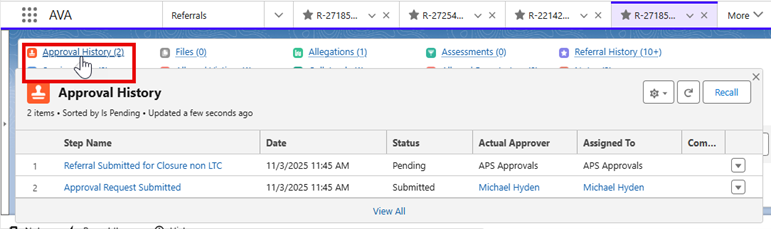
Approval History Quick link view showing Approval History of the referral.
  1. In the Approval History quick link, you will have the Recall button in the top right.  Click Recall.
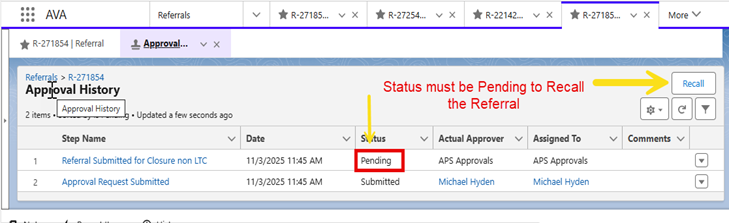
Approval History view showing Referral Submitted for Closure in Pending status and the Recall button
  1. Type in a Recall reason and click Recall. 
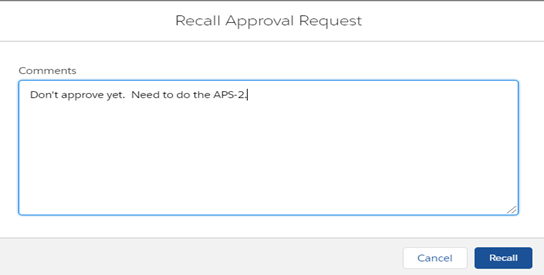
Comment box to add a comment for Recalling Referral.
  1. The Status will change to Recalled, and now the referral will be unlocked. 
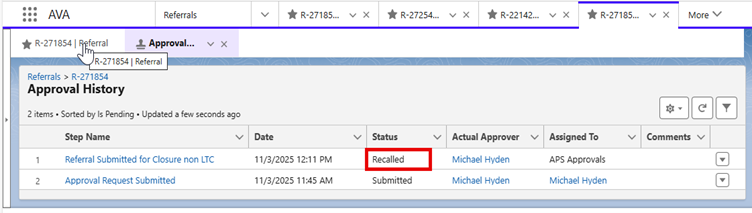
Approval History view showing Referral Submitted for Closure now in Recalled status and unlocked.
See a mistake on this page?