The legal team no longer responds to emails. Everything should be entered through the CAP Legal Questions. This allows for nothing to be lost in an email box and also helps CAP Legal track the amount of work that they do in certain areas. Please staff with your supervisor before entering a legal question ticket.
Tickets can be entered by following the below process:
- The site can be accessed through this link: CAP Legal Questions. Please bookmark this site.
- In the upper left corner, you will see + Add New Item.

- Once you have selected Add New Item, you will then complete the ticket:
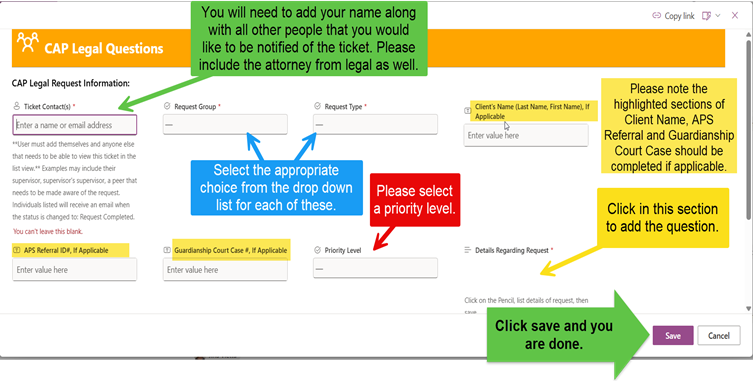
- Select the Save button.
***When adding people to the ticket type the @ symbol, then type their name, and finally choose their name from the list.
**Priority level: Only choose Urgent if an answer is needed within 5 days.
