How to Document a Monthly Guardianship Follow-Up
There are 2 different types of guardianship follow up forms (nursing home/hospital placement OR in home/group home/RCF placement). Choose the appropriate form based on the client’s placement.
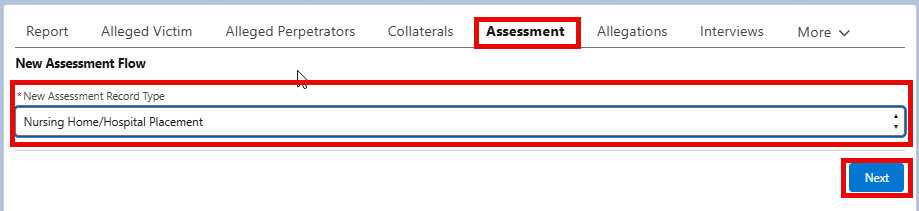
- Click “Assessment”
- Select appropriate assessment from the picklist.
- Click Next
- Select appropriate type of follow-up from the picklist.
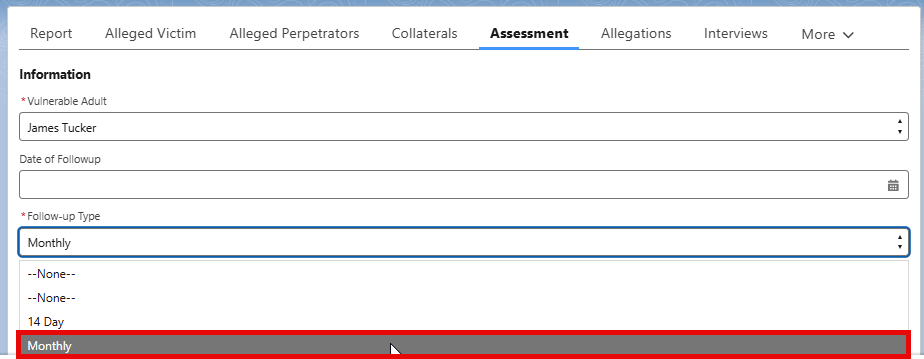
- Enter the date of the actual follow up NOT the date the form is completed
- Fill out assessment as applicable
- Follow-up Details: Use this space for the visit narrative. Document who you talked to and any concerns with the client. See example for which field to use in screenshot below.
- If the assessment is ready to be submitted, click “Submit for Approval” and click Next. This will submit the assessment to your supervisor for approval.
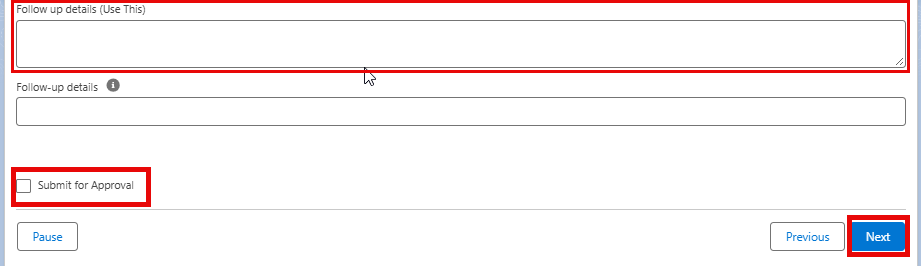
**If the assessment is not ready for submittal to your supervisor, you can click Next without selecting to submit. This will create and save the assessment and you must come back to complete and submit the assessment on a later date.
